Message-Driven Architecture


A message-driven architecture can have the following components.

  • Producer – The one that generates a message and then forwards it ahead.
  • Consumer – The one for whom the message was intended; who will then read it and process accordingly.
  • Queue – A communication model that saves the messages so they can be sent ahead to other services for processing.
  • Exchange – It is a queue aggregator. This means that it can apply abstraction on the queues and manage the messages so they can be sent to the right queues.
  • Message – It consists of the headers which contain metadata as well as a body. The body entails the actual contents of the message.

A message-driven architecture also needs a message broker. This message broker decides who should send the message or who should receive it.

Surely, the benefits of the microservices outweigh those of monolithic applications but the paradigm shift means that you will have to look into the communication protocols and processes between various components of your application. By using the same mechanisms of monolithic systems in a microservices application, it may impact the performance of the system and slow it down, particularly if you are coding distributed applications.

To counter such problems, the isolation of the microservices architecture can be helpful. For this purpose, asynchronous communication can be utilized to link microservices. This can be done through the grouping of calls. The services in a microservices application are often requires interaction through protocols like HTTP, TCP etc.

The general opinion of the developers regarding the microservices architecture is to inject decoupling in applications while maintaining the cohesiveness of the system. A true microservices applications is one in which each service has its own data model and business logic.

A protocol can be either asynchronous or synchronous. In the synchronous protocol, a client can forward a request. The system will then listen for a response. The entire process is independent with client code execution. An example of such messaging is the HTTP protocol. In asynchronous protocols, the sender will not listen or wait for a response.

Types of Message Brokers

There are many message brokers that are used for message-driven architectures. Some of these are the following.

RabbitMQ

RabibtMQ is perhaps the most popular message broker out there. It is open-sourced and uses the Advanced Message Queuing Protocol (AMQP) with cross-platform functionality. Whether you are a Java developer or a C# one, all of your microservices can be used to communicate the message with different microservices.

Azure Event Hub

This one is a PaaS (Platform as a Service) related solution that is offered by Microsoft Azure. It does not need any management and can be easily consumed by a service. It also uses AMQP. It basically has an Azure Event Hub that works with partitions and communicates with consumers and receivers.

Apache Kafka

Kafka is the brainchild of Linkedin and was made open-source in 2011. It is not dissimilar to Azure’s solution and has the capability to manage millions of messages. However, the difference stems from the fact that unlike the Event Hub, it works with IaaS (Infrastructure as a Service). Though, newer solutions are also integrating Kafka with PaaS.

There are two types of asynchronous messaging communications for message-driven architectures.

Single Receiver

Single receiver message-driven communication is particularly helpful when dealing with asynchronous process while working with different microservices. A single receiver is one in which a message is sent only once by its consumer. After forwarded, it also will be processed only once. However, it must be noted that at times a consumer may send the message more than once. For example, there is an application crash; the application will try to repeat the message. In the case of an event like an Internet connectivity failure, the consumer can send a message multiple times. However, it must be noted that it should not be combined with the HTTP communication that is synchronous. Message-driven commands are especially useful when developers scale an application.

Multiple Receivers

To get your hands on a more adaptable technique, multiple receivers message-driven communication can be proficient. This communication utilizes the subscribe/publish strategy. This refers to an approach where a sender’s message can be broadcasted to multiple microservices in the application. The one who sends a message is called the publisher while the one who receives it is called the subscriber. Additionally, further subscribers can be added to the mix without any complex modification.

Asynchronous Event-Driven

In the case of asynchronous event-driven communication, a microservice will have to generate an event for integration. Afterward, another service is fed with the information. Other microservices engage in the subscription of events so messages are received in an asynchronous manner. Subsequently, the receivers will now have to upgrade their entities that entail information regarding the domains so further integrations events can be published.

However, here the publish-and-subscribe strategy requires tinkering with event bus. The event bus can be coded in such a way that it occurs as a means of the interface while dealing with API (Application Programming Interface). To be more flexible with the event bus, other options are available through processes like a messaging queue where asynchronous communication and the publish-and-subscribe strategy are fully supported.

However, it must be noted that all the message brokers have different levels of abstraction. For example, if we are talking about RabbitMQ, then it has a lower level abstraction if we compare it with solutions like MassTransit or Brighter. Brighter and others use RabbitMQ for abstraction. So, how to choose a message broker? Well, it depends on your application type as well as the scalability needs. For simple applications, a combination of RabbitMQ and Docker can prove to be enough.

Though, if you are developing large applications then Microsoft’s Azure Service Bus is a powerful option. In the case of desiring abstraction on a greater level, Brighter and MassTransit are the good options. If you are thinking about developing your own solution then it is not a good idea since it is time-consuming and the cost is too high.

What Is Event-Based Architecture?


Before reading about event-based architecture, you will need to understand what an event is. An event can be termed as any ‘change’ that occurs between two states. For example, a module in application sends a message to another component. This message can be the event that will trigger a change in the processing of the system. Event-based architectures are favored because they help software development of asynchronous and scalable applications.

What Is Event-Based Architecture?

Event-based architecture is a type of software architectural design in which the application component receives the notification of an event. As a result, a response is generated. In comparison to other paradigms, event-based architecture is considered loosely coupled. EDA can be considered as an approach for coding software solutions where the heart of the architecture lies in ‘events’ which process the communication between different components.

How Does Event-Driven Architecture Work?

The architecture has several components that help to speed up the development process of an application.

Queue

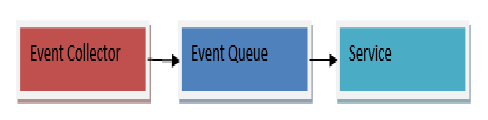
In an event-based architecture, the requests accumulate into queues called event queues. From these queues, the events are then sent to the services where they are processed.

The events in this architecture are collected in central event queues. For example, check the following diagram.

queue


S here denotes the service. The queue will provide an event for each service accordingly.

Log

The event log exists on the hard disk. It consists of the messages that were written for the event queue. An event queue is useful because in case of an unexpected system shutdown or crash, rebuilding can be eased through the contents of the event log. The following diagram will help to explain the event log’s place in the architecture.


log


The event log can also be utilized for any future back up. This back up can take the entire state of the system which can be critical in testing. The comparison between the performance of both the old and newer releases of an application can be analyzed through this backup.

Event Collector

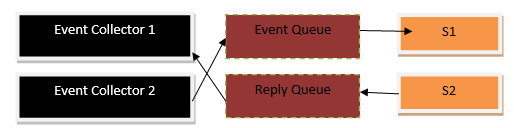
Okay so far we have talked about the collection of the events in the event queue but how exactly are the events received? Well, the answer lies within the term ‘event collector’. These collectors get requests from protocols like HTTP and forward them to the event queue. Further understanding can be gained through the following diagram.

eventCon


Reply Queue

Not all the events can be categorized as same. Sometimes, an event does not require a response. For example, a user has entered some data in a feedback form. In this case, the system does not require sending a response. However, some events require the system formulating a response for a request. The request here will be called as an ‘event’ in our architecture. For this response, a reply queue is needed which will utilize the event queue. The collectors that forward the events can also provide the response back. However, it must be noted that the event log does not record the contents of the reply queues. The following diagram can explain the reply queue.


replay


Read vs. Write

When all the requests from the collectors act as an event to trigger a function, then all of them are added in the event queue. In the case, this queue is linked to the event log. All the requests are persisted which slows down the system. If some of the non-important requests can be eliminated then the event queue’s processing can be increased considerably.

The core concept behind this persisting of events is the rebuilding of the former states of a system. This means, events that actually modify the state of the system, need to be persisted to the event log. This can be done through the classification of events into write and read events. A write event is one in which the states of the system are modified while a read event does not modify any state. As a result, the application can now only persist during the write events which in turn will provide a much-needed boost to the management and processing of the event queue.

Ratios between both read and write events can be drawn to further gain an understanding of the difference. For instance, our system has 10 events. Out of the 10, only 2 events are actually changing the state of the system. Without classification, we can find all of them to be slowing the speed of the event queue through persistent to the log. However, by dividing them between read and write events, only 2 of our events require to be persisted. Subsequently, the other 8 read events cannot risk the speed of the queue.

Now a question arises. How to distinguish between these events? Events should be distinguished through the collectors. If a collector does not separate them, then the event queue will be unable to make a decision of its own.

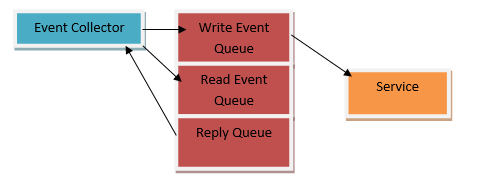
Another approach is to divide an event queue. One event queue will be responsible for dealing solely with the read events while the second one can look after the write events. This saves the resources as no other component in the system has to decide on the persistence of the events. The following example shows the idea behind this approach. Some may feel that it may make the system more complex but in reality, it is reducing the workload of the application.


event


Final Thoughts

The main benefit of event-based architectures is seen while working with scalable enterprise applications. Event-based architecture also particularly assists in the testing phase and can generate productivity in test driven approaches which means that each core component of an application can be designed and developed separately. Additionally, with low to no coupling, the architecture stands as an excellent choice for the removal of complexity in applications.

What Is Cloud Computing? What Are the Challenges Faced by the Cloud?


The word ‘cloud’ has gained significant traction over the past decade. Traditionally, businesses had on-premises architecture. This meant that all the hardware, storage, networking, and other IT assets of an organization were physically located in the organization’s premises. However, this meant that many businesses had to deal with issues related to their IT setups.

For instance, a software development company that worked on the application level was riddled with hacking attempts. As a result, instead of focusing on their core competency, the company had to focus on security solutions. With the advancement of Computer Science and IT technologies, businesses now have the option to outsource their IT requirements to a cloud computing service. So what is cloud computing?

What is Cloud Computing?

Cloud computing refers to the sharing of a wide variety of computing resources that are located remotely. These services are offered by cloud providers. They charge a monthly or yearly fee in exchange for the required services. The word cloud here refers to the Internet through which users can access these services. This means that organizations no longer have to spend a huge sum of money on their IT assets and can focus more on their operations through the enhanced security, speed, mobility, etc.

Cloud Migration Strategies

While moving to the cloud, a number of strategies can ease the transition.

Rehosting

Rehosting means the relocation of a company’s physical servers through IaaS. This means that if a company intends to quickly migrate its systems and architecture, it can do so through rehosting. Hence, it is one of the most common strategies for companies after their management finalizes the decision to adopt the cloud. However, since it is IaaS, the company does not fully delegate its computing needs. As a consequence, OS and application level needs like patching and testing will still be the company’s responsibility.

As an example, consider a Java Spring application which was previously hosted on your Linux environment on a physical server. Now, you can utilize a cloud platform like AWS or Microsoft Azure where you can set up and customize your own Linux and Java environments. The hardware and lower level complexities and abstractions would be handled by the cloud platforms. This will remove the requirement for a physical server for your application. You will only need some modification with the DNS settings, after which your website can become live again.

Replatforming

Replatforming means that an application is upgraded from an onsite software platform to the cloud without any compromise or change in its functionality. This can include moving a RDBMS to the cloud using a database-as-a-service. Similarly, application servers can also be moved to the cloud. This can be extremely helpful in minimizing licenses fees.

For example, consider that you are paying for an application server in Java. If you will ‘re-platform’, then the cloud can run a variety of application servers like the open-source Apache Tomcat which can boost your project.

Adopting re-platforming for your business means a slower migration strategy as compared to rehosting but it offers the best of both worlds as it can strike a fine balance between rehosting and refactoring. As a result, businesses are able to profit through cloud fundamentals and cost optimization, limiting the need for the costs and resources that are needed in the refactoring strategy.

Refactoring

Traditional IT architectures and processes may have been successful earlier but today’s IT world is a different place. The changes and evolutions in development tools and technologies are occurring at a rapid pace. This means that a legacy system that was built with the best tools of its time in early-2000s will not function well with the business requirements of the present-day world.

Replatforming assists companies to reduce their expenditure without modifying their software environments and applications altogether. However, refactoring goes a step ahead. Refactoring deals with the complete transformation of business processes by using cloud-native platforms and features. Thus, the cloud controls the entire software lifecycle including development and deployment of a project.

While refactoring is slower as well as more expensive as compared to other migration strategies, it helps to shift from a monolithic architecture to a serverless one. As a result, the investment can go on to generate greater profits for a business in comparison to a business that still relies on previous IT setups.

Challenges Faced by the Cloud

Despite its benefits, cloud computing faces challenges.

Reluctance

Long before the cloud emerged as a leading technology, businesses relied on traditional IT practices. Many of these businesses were able to maintain their revenues without the need for any major IT adoption. However, with the passage of time, the computing requirements increased with the huge influx of data, and thus the previous strategy of on-premises IT architecture incurred heavy expenses. Therefore, businesses adopted the cloud, which increased their productivity.

However, not all businesses accepted the change. For non-tech savvy management, this meant a giant leap. The decision to completely revolutionize the IT structure of a company is unappealing to many and there are still businesses that are hesitant to adopt the cloud.

Service Quality

When businesses ponder over the decision to move to the cloud, they contact cloud providers for their services. These providers issue a SLA (Service Level Agreement). Some of the questions that businesses need to address in most SLAs are:

  • What are all the cloud services and features that will be provided to the business?
  • What will the provider do in case of an IT failure?
  • Will the business operations run 24/7 even in the case of an IT issue in the provider’s data center?
  • What are the cybersecurity measures for the protection of the company’s data?

Often businesses are not satisfied with the SLAs and consider them to be limited for their business requirements.

Dependability on the Internet

Since cloud services are accessible over the Internet, 24/7 connectivity is vital for smooth operation. This means that as a business goes offline, the Internet-based cloud features and services would be unavailable for the business and its clients. Thus, businesses have to make sure that their cloud provider has backup solutions that can help in the provision of continuous services.

Bandwidth Cost

With the advent of the cloud, businesses no longer have to purchase a server or spend money on the repair of their hardware. However, another cost has emerged. This cost is related to the bandwidth cost. These may be negligible with small applications but when it comes to data-intensive applications, businesses will need to increase their bandwidth expenses.

Final Thoughts

While cloud computing technology deals with a number of technologies, the selection of the appropriate cloud migration strategy can help to minimize the risks explained above and provide a much-needed boost to businesses.